APCSA: Intro to Computer Science - Overview of a Computer Program and Data Types
Activity Goals
The goals of this activity are:- To identify the major components of a Java program, including a method and a class
- To explain that binary data uses "bits" of
1'sand0'sto represent data of various types, both numeric and textual - To identify primitive data structures and their uses
- To be able to create and compile a Java source file in a chosen development environment
- To be able to call System class methods to generate output to the console (APCSA Framework Topic 1.1 Mod 1.A)
- To be able to identify the different primitive data types used in the Java language
- To be able to create string literals (APCSA Framework Topic 1.1 Var 1.A)
- To be able to identify the appropriate data type category for a particular specification. (APCSA Framework Topic 1.2 Var 1.B)
- To be able to declare variables of the correct types to represent primitive data. (APCSA Framework Topic 1.2 Var 1.C)
Supplemental Reading
Feel free to visit these resources for supplemental background reading material.The Activity
Directions
Consider the activity models and answer the questions provided. First reflect on these questions on your own briefly, before discussing and comparing your thoughts with your group. Appoint one member of your group to take notes for the group, and appoint another member to discuss your findings with the class. Report out on areas of disagreement or items for which you and your group identified alternative approaches.Model 1: Hello World
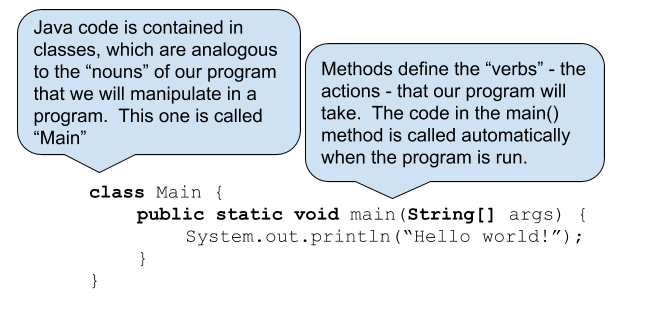
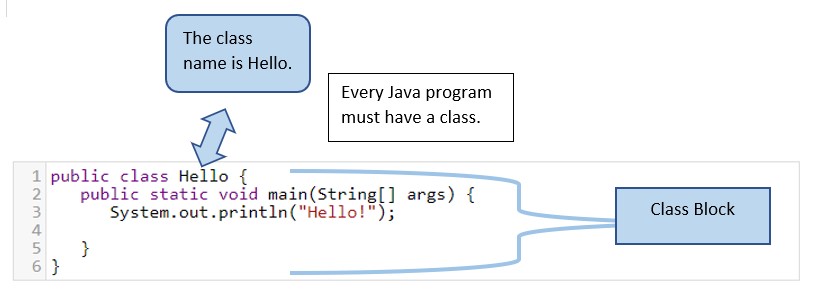
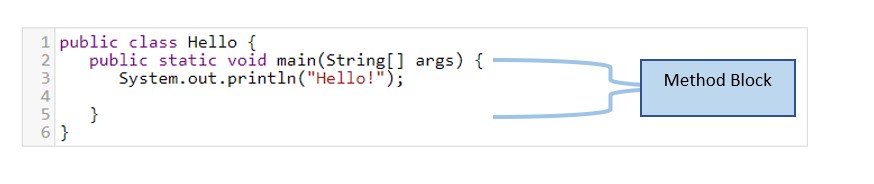
| Character | Name | Description |
|---|---|---|
| { } | Opening and closing braces | Block to enclose statements |
| ( ) | Opening and closing parenthesis | Used with methods |
| [ ] | Opening and closing brackets | Used with arrays |
| // /* */ |
Slashes | Comments (single line and double line) |
| ; | Semicolon | End of a statement |
Questions
- What do you think the curly braces represent and enclose?
- What character is used to end a statement of code within a method?
Model 2: Your First Program
Questions
- What do you think the
//characters represent? - Go to https://repl.it and enter the code above into a file called
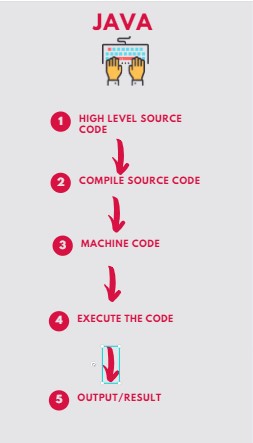
Main.java(the filename is almost always the same as the class name, which we calledMainin this example). Click the "Run" button at the top to run the program. - You may have noticed two commands executed before the program ran and printed "Hello world!" - to execute a program with the java command, the code in each class must first be compiled using the javac command. Development environments such as repl.it usually do these steps for you. Note that you can run many of our code examples in repl.it or the Java Visualizer
- Change the code so that instead of printing "Hello World!" the code instead prints a greeting to your partner.
- Change the code to the following, and execute it.
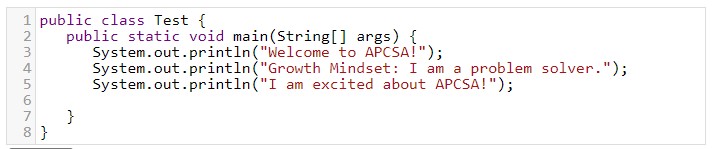
- What is the difference between
System.out.println()andSystem.out.print()? APCSA U1 Topic1.1 MOD 1.A.1 and MOD 1.A.2 - What is wrong with this program? (Debug the program).

- Modify the program to produce the following output:
How are you?
Everything is going well.
Model 3: Primitive Data Types

Type Name
Use
Example
int
Whole number numeric values
int participants = 40;
double
Fractional or decimal numeric values (these are called "floating point" values)
double price = 5.95;
boolean
True/False
boolean raining = false;
char
A single character
char grade = 'A';
String
Textual data
String name = "Lee";
Questions
- What is the data type of the value
"Hello World!"? - Observe the odometer above. What is the place value of each of the digits in a decimal system? How would this odometer count if the only digits it could display were 1 and 0? What would each place value be then?
- How might a computer represent a whole number using only 1 and 0 digits? How do you use the decimal digits 0 through 9 to represent all whole numbers?
- How might a computer represent a whole number using only 1 and 0 digits? How do you use the decimal digits 0 through 9 to represent all whole numbers?
- How might a computer represent a True/False boolean?
- How might a computer represent the letter
'A'or the word"Hi!"?